Markdown vs. Rich Text: What Should You Actually Draft In?
You highlight a line to make it italic, and Google Docs quietly turns your straight apostrophe into a curly one, auto-capitalizes a word you didn’t want capitalized, and suggests a heading style for a sentence that was never meant to be a heading. None of that took more than two seconds. It still pulled you out of the sentence you were writing, and now you’re reading about smart quotes instead of finishing the paragraph. This is the actual argument for markdown over rich text, and it has nothing to do with looking like a hacker in a terminal.
Rich text was built for a different job
Word processors inherited their whole design from the office memo and the printed report — documents meant to be formatted once and read by someone else. That’s why the toolbar is the first thing you see: fonts, headings, tables, track changes, comment threads. All genuinely useful if you’re producing a document for a client or a committee. None of it has anything to do with getting a first draft out of your head. A rich text editor hands you a hundred formatting decisions before you’ve written a hundred words, and every one of them is a tiny detour away from the sentence in front of you.
What markdown actually removes
Markdown’s whole pitch is that formatting becomes typing instead of clicking. An asterisk for emphasis, a pound sign for a heading, nothing that requires taking your hands off the keyboard or reaching for a mouse. But the deeper benefit isn’t the syntax — it’s that the file underneath stays plain text. A .md file opens in anything, forever, with no proprietary format to rot or app subscription to lapse. Compare that to a .docx from 2009 with formatting that only half-survives being opened in a different program, and the appeal of a file you can read with cat in a terminal twenty years from now stops feeling precious and starts feeling practical.
The formatting that’s actually worth keeping
None of this means formatting is the enemy — it means most of it is unnecessary at the moment you’re drafting. Typewriter Note’s approach is the narrow version of markdown’s bet: select some text and a small toolbar appears with bold, italic, and a couple of basics, and it disappears the instant you let go of the selection. No ribbon sitting across the top of the screen all day, no dropdown of nine heading styles waiting to be considered for a journal entry.
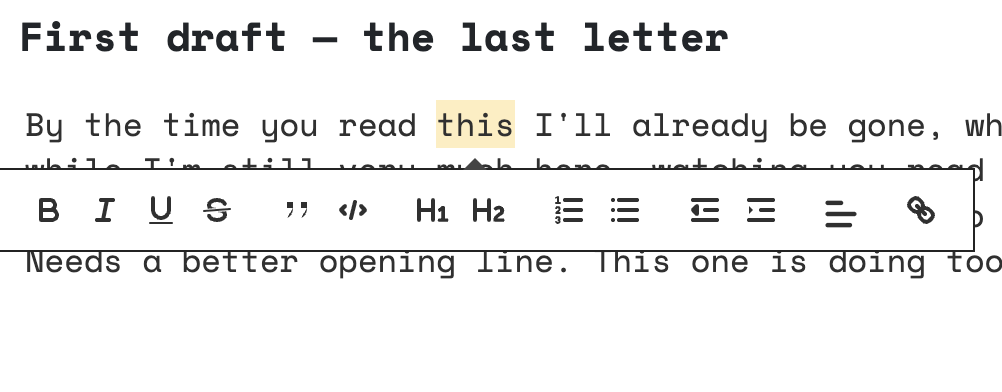
That’s also where the honesty has to kick in: there’s no heading structure here, no way to build a table, no chapters or nested documents. If you’re outlining a novel with forty scenes that need reordering, or writing a report that has to land on someone’s desk looking a particular way, this app will frustrate you, and a tool built for that job will serve you better. The bet is narrower than that — it’s for the writing that lives as one piece, not a structured manuscript, and it only pays off if that’s actually what you’re working on.
Draft loose, format later — if you even need to
The practical move, whichever tool you land on, is to stop treating drafting and formatting as the same task. Write the thing first in whatever lets your hands keep moving, then decide afterward whether it needs headings, bold text, or any structure at all — plenty of short stories, journal entries, and essays never do. Typewriter Note is built around skipping that second step entirely for most writing, and you can try the demo without an account to see whether a page with almost nothing on it changes how fast a paragraph actually gets written. If the deciding factor for you is less about formatting and more about which app disappears into the background completely, the comparison of distraction-free writing apps covers that side of the question.